JavaScript Event Loop: How Async Code Really Works
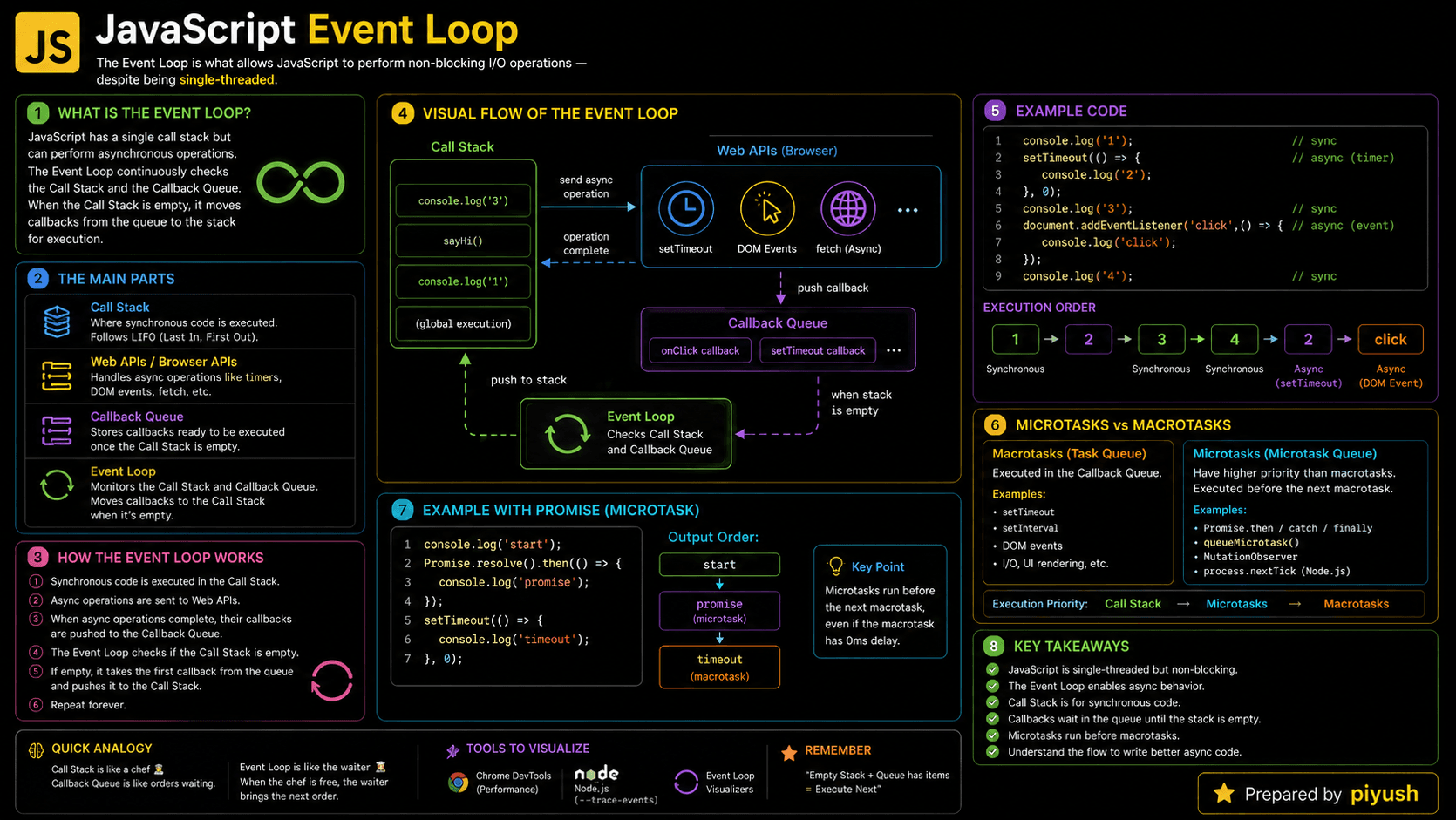
Why doesn't setTimeout(..., 0) run immediately? And why does a Promise callback always beat a timer to the finish line? Both answers come down to the JavaScript event loop.
The event loop coordinates your synchronous code, timers, user interactions, network responses, and Promise callbacks. Once you understand it, you can predict execution order, keep interfaces from freezing, and debug async JavaScript without guessing.
Here's the ordering puzzle in two lines:
setTimeout(() => console.log('Timer'), 0);
Promise.resolve().then(() => console.log('Promise'));

// Output:
// Promise
// Timer
The timer was scheduled first, yet the Promise handler wins. That's the event loop draining its microtask queue before it touches the next regular task — the rule this guide unpacks.
What You'll Learn
- Why JavaScript needs an event loop
- How the call stack and queues work together
- Why microtasks run before regular tasks
- How Promises, timers, and
async/awaitare scheduled - Common event loop mistakes and performance problems
- How to predict the output of asynchronous code
Prerequisites for Learning the Event Loop
You'll follow the execution flow more easily if you already know your way around JavaScript functions, callbacks, and Promises.
You can also test your basics here:
Why Does the JavaScript Event Loop Exist?
The event loop exists so JavaScript can deal with slow or unpredictable work without waiting around for each piece to finish. A network request, a timer, a click, a file read — any of these can take milliseconds or seconds. Freeze the main thread for that long and your app stops responding.
JavaScript runs application code on a single main thread. Without an event loop, you'd be stuck choosing between blocking execution while you wait or polling manually to find out when something finished.
Runtime designers took a third path: hand supported operations off to the browser or server environment, where they run outside the call stack. When one is ready, its callback gets scheduled for later. You get a responsive app and callbacks that still run one at a time, in a predictable order, on the main thread.
A Beginner-Friendly Event Loop Mental Model
Before the technical details, it helps to picture one worker working through a carefully organized list of jobs.
Imagine a restaurant with one chef, a stack of active orders, and two waiting areas. The chef always finishes the current order before picking up another.
Quick priority requests — adding a final garnish, say — wait in the priority area. Regular orders wait in the standard area. The moment the chef finishes the current job, every priority request gets handled before the next standard order starts.
The chef is JavaScript's call stack. The two waiting areas are the microtask and task queues. The event loop is the coordinator watching whether the chef is free and deciding which waiting job goes next.
Nobody is trying to cook every dish at once. The point is to keep the chef busy instead of standing idle while some slow delivery makes its way across town.
Strip away the analogy and here's what actually happens: the runtime hands supported async operations to browser or platform APIs. Their callbacks land in a queue when they're ready, and the event loop schedules them once the call stack empties out.
A Real-Life Analogy for Asynchronous JavaScript
Think about running a load of laundry while you cook dinner. You don't stand there watching the drum spin. You start the machine, get back to the stove, and deal with the beep when it comes.
The machine does its work elsewhere, but you still handle the completion signal yourself, when you're free to. JavaScript runtimes schedule timers, network operations, and user events the same way.
What Is the JavaScript Event Loop?
The JavaScript event loop is the runtime's scheduling mechanism. It watches the call stack and the queued work. When the stack goes empty, it processes pending microtasks, then lets the next task run — a timer callback, a user event, whatever is waiting.
Here's a detail that catches people out: the loop itself isn't part of the JavaScript language. The spec defines Promise jobs and how they're drained, but the surrounding loop and every other task source come from the runtime environment. Browsers and Node.js both provide one, and their internal scheduling details differ.
JavaScript is called single-threaded because one main call stack executes your application code. Browsers still use other threads behind the scenes for networking, timers, rendering, and similar platform work.
How Does the JavaScript Event Loop Work?
The cycle is short: run synchronous code, drain the microtask queue once the current task finishes, then pick another task. Rendering may slip in between tasks. This repeats for as long as the page, worker, or server process is alive.
Run the current task
JavaScript creates execution contexts and pushes function calls onto the call stack. Synchronous statements run from top to bottom.
Delegate supported asynchronous work
Timers, network requests, and DOM events move to the host environment instead of sitting on the call stack.
Queue callbacks when work is ready
Timer and event callbacks enter a task queue. Promise reactions and
queueMicrotask callbacks enter the microtask queue.
Drain the microtask queue
Once the stack is empty, the runtime keeps executing microtasks until none are left.
Render and select another task
The browser may repaint the screen, then the event loop grabs the next available task and starts over.
Sketched out, the browser flow looks like this:
Current task
    ↓
Call stack becomes empty
    ↓
Drain all microtasks
    ↓
Browser may render
    ↓
Run the next task
↺Memorable rule: synchronous code first, then microtasks, then the next regular task.
Think Like the JavaScript Engine
That's the view from outside. Inside, the engine and the host environment cooperate on every scheduled callback, and the sequence goes like this.
-
An execution context is created.
The global script and every function you call get an execution context holding everything needed to run that code. -
Functions enter the call stack.
Each call is pushed onto the stack, and popped off when the function returns or throws an uncaught error. -
Lexical environments resolve variables.
Every execution context leans on its lexical environment and scope chain to find local, outer, and global variables. -
Host operations run outside the stack.
CallingsetTimeoutregisters a timer with the host environment — the callback never goes straight onto the stack. -
Ready callbacks enter a queue.
Promise reactions become microtasks. Timers, events, and most other callbacks become tasks. -
The event loop waits for an empty stack.
It will not interrupt running JavaScript to squeeze in a queued callback. -
Retained data stays in memory.
Queued callbacks hold referenced variables alive through closures. Garbage collection can only reclaim data once nothing can reach it.
Call Stack, Tasks, and Microtasks Compared
Each of those pieces has its own job in the runtime. Seeing them side by side makes the division of labor clearer.
| Runtime part | Purpose | Common examples |
|---|---|---|
| Call stack | Executes current synchronous code | Function calls, calculations |
| Host APIs | Manage supported external operations | Timers, DOM events, network requests |
| Task queue | Stores callbacks for future event loop turns | setTimeout, clicks, messages |
| Microtask queue | Stores high-priority follow-up work | Promise handlers, queueMicrotask |
| Event loop | Coordinates stack and queued work | Scheduling the next callback |
One clarification worth holding onto: microtasks never run while synchronous code is still going. Their priority kicks in only after the current task and the call stack have finished.
A microtask can schedule another microtask. Keep adding them and you'll starve regular tasks and browser rendering indefinitely.
How to Recognize the Event Loop in Real Code
With the vocabulary in place, spotting the event loop in a codebase gets easy. It shows up any time code schedules work for later — scan for setTimeout, setInterval, Promises, async functions, await, queueMicrotask, event listeners, network requests, and file-system APIs.
You'll find these patterns in almost every production codebase:
- Click and keyboard event handlers
fetch()requests and Promise chains- React effects and state updates triggered by events
- Debouncing search input with timers
- Node.js request handlers and file operations
- Breaking expensive work into smaller scheduled tasks
It also becomes relevant the moment execution order surprises you. Callback firing later than expected? Timer running late? Page frozen mid-loop? Check what's on the call stack, then work out whether that callback lands in the task queue or the microtask queue.
Event Loop Example with a Timer and Promise
Time to watch the rules play out. This snippet is the ordering question you'll meet in almost every interview:
console.log('Start');

setTimeout(() => {
  console.log('Timer');
}, 0);

Promise.resolve().then(() => {
  console.log('Promise');
});

console.log('End');

// Expected output:
// Start
// End
// Promise
// Timer
The whole script counts as one task. "Start" and "End" log synchronously. Meanwhile the Promise handler goes to the microtask queue and the timer callback goes to the task queue.
Once the script finishes, the microtask runs before the next task gets a turn. That's why "Promise" beats "Timer". A zero-millisecond delay means "run no earlier than this delay," not "run immediately."
Practical Event Loop Example with async and await
async/await follows the same microtask rules, though the syntax hides them well. An async function starts running synchronously; the code after await continues later as a microtask, once the awaited Promise settles.
async function loadProfile() {
  console.log('Loading profile');

  const profile = await Promise.resolve({ name: 'Maya' });

  console.log(`Welcome, ${profile.name}`);
}

console.log('Page started');
loadProfile();
console.log('Page ready');

// Expected output:
// Page started
// Loading profile
// Page ready
// Welcome, Maya
Calling loadProfile() logs "Loading profile" right away. Then await pauses that one function without blocking the thread, so "Page ready" gets its turn. The function picks up where it left off from the microtask queue.
Advanced Event Loop Example with Nested Scheduling
Things get more interesting when callbacks schedule their own work. Queue order matters at every single turn, not just the first one.
setTimeout(() => {
  console.log('First timer');

  queueMicrotask(() => {
    console.log('Microtask inside first timer');
  });
}, 0);

setTimeout(() => {
  console.log('Second timer');
}, 0);

// Expected output:
// First timer
// Microtask inside first timer
// Second timer
Notice the second timer waits its turn. The first timer task finishes, the runtime drains the microtask it queued, and only then does the second timer task begin.
Common Event Loop Mistakes Developers Make
Nearly every event loop bug traces back to one of two wrong assumptions: that scheduled code runs immediately, or that async syntax somehow makes CPU-heavy work non-blocking. Here are the three you'll hit most often.
Mistake 1: Treating setTimeout as an Exact Schedule
Common mistake: A timer delay is a floor, not a promise. Busy synchronous code will push the callback back.
setTimeout(() => {
  console.log('Exactly one second later');
}, 1000);
If the main thread is busy, this callback fires well after one second.
Mistake 2: Awaiting setTimeout Directly
setTimeout hands back a timer handle — a number in browsers, a Timeout object in Node.js. Either way it's not a Promise, so there's nothing for await to pause on.
async function run() {
  // ❌ Wrong: this does not wait for the timer callback
  await setTimeout(() => {
    console.log('Finished');
  }, 1000);
}
That await resolves on the next microtask and run() moves on before the timer ever fires. Wrap the timer in a Promise so there's something real to wait for:
function delay(milliseconds) {
  return new Promise((resolve) => {
    setTimeout(resolve, milliseconds);
  });
}

// ✅ Correct
async function run() {
  await delay(1000);
  console.log('Finished');
}

run();

// Expected output after about one second:
// Finished
In Node.js you can skip the wrapper — node:timers/promises exports a Promise-based setTimeout.
Mistake 3: Blocking the Main Thread
The previous two mistakes cost you correctness. This one costs you the whole page. An expensive synchronous loop stops timers, clicks, microtasks, and rendering dead.
// ❌ Blocks the main thread until the loop finishes
for (let index = 0; index < 2_000_000_000; index += 1) {
  // Expensive synchronous work
}
Move CPU-intensive work to a Web Worker in the browser, or a worker thread in Node.js. When that's not an option, split large UI operations into smaller chunks that hand control back between tasks.
JavaScript Event Loop Best Practices
Avoiding those mistakes comes down to two habits: keep individual tasks short, and make your scheduling choices deliberate.
Keep tasks short: Trim event handlers and synchronous calculations. Long tasks delay rendering and make buttons, scrolling, and typing feel sluggish.
Use microtasks for small follow-ups: Not heavy computation. Microtasks must all finish before the browser can move to the next task.
Reach for await for readability: Just remember that everything before the first await still runs synchronously.
A few more habits worth keeping:
- Skip deeply chained scheduling when a plain
asyncfunction reads better. - Handle Promise rejections with
try...catchor.catch(). - Measure before you pick a scheduling strategy.
- Use Web Workers or worker threads for sustained CPU-heavy operations.
- Never depend on exact timer timing for calculations that matter.
Where the Event Loop Is Used in Production
Follow those practices and you'll be in good shape, because the event loop sits underneath nearly every interactive and asynchronous behavior you ship.
- User interfaces: click, input, scroll, and keyboard callbacks
- API communication:
fetch, Promise handlers, andasync/await - Animations: coordinating updates without blocking browser rendering
- Search fields: debouncing requests with timers
- React applications: event handlers, effects, and asynchronous state workflows
- Node.js servers: processing many requests while waiting for network or file operations
- Background scheduling: retry logic, polling, and delayed notifications
One caveat to carry with you: the event loop gives you concurrency, not parallelism. CPU-heavy JavaScript still runs on one thread.
JavaScript Event Loop Interview Questions
Frequently Asked Questions About the Event Loop
Related JavaScript Learning Resources
Learn how Promise states, handlers, and chaining work with the microtask queue.
Write readable asynchronous code and understand what happens when a function pauses.
Review callback functions before working with timers, events, and asynchronous APIs.
🔑 Key Takeaways
- The event loop schedules queued work only when the call stack is empty.
- Synchronous code always finishes before any queued callback runs.
- Promise handlers and
queueMicrotaskuse the microtask queue. - Microtasks run before the next timer, event, or other regular task.
- A zero-delay timer is scheduled for later, never executed immediately.
- Long tasks and endless microtasks delay rendering and user input.
Test Your Event Loop Knowledge
So — can you predict the output of code mixing timers, Promises, and async/await without running it?