JavaScript Promises Explained: Examples and Best Practices
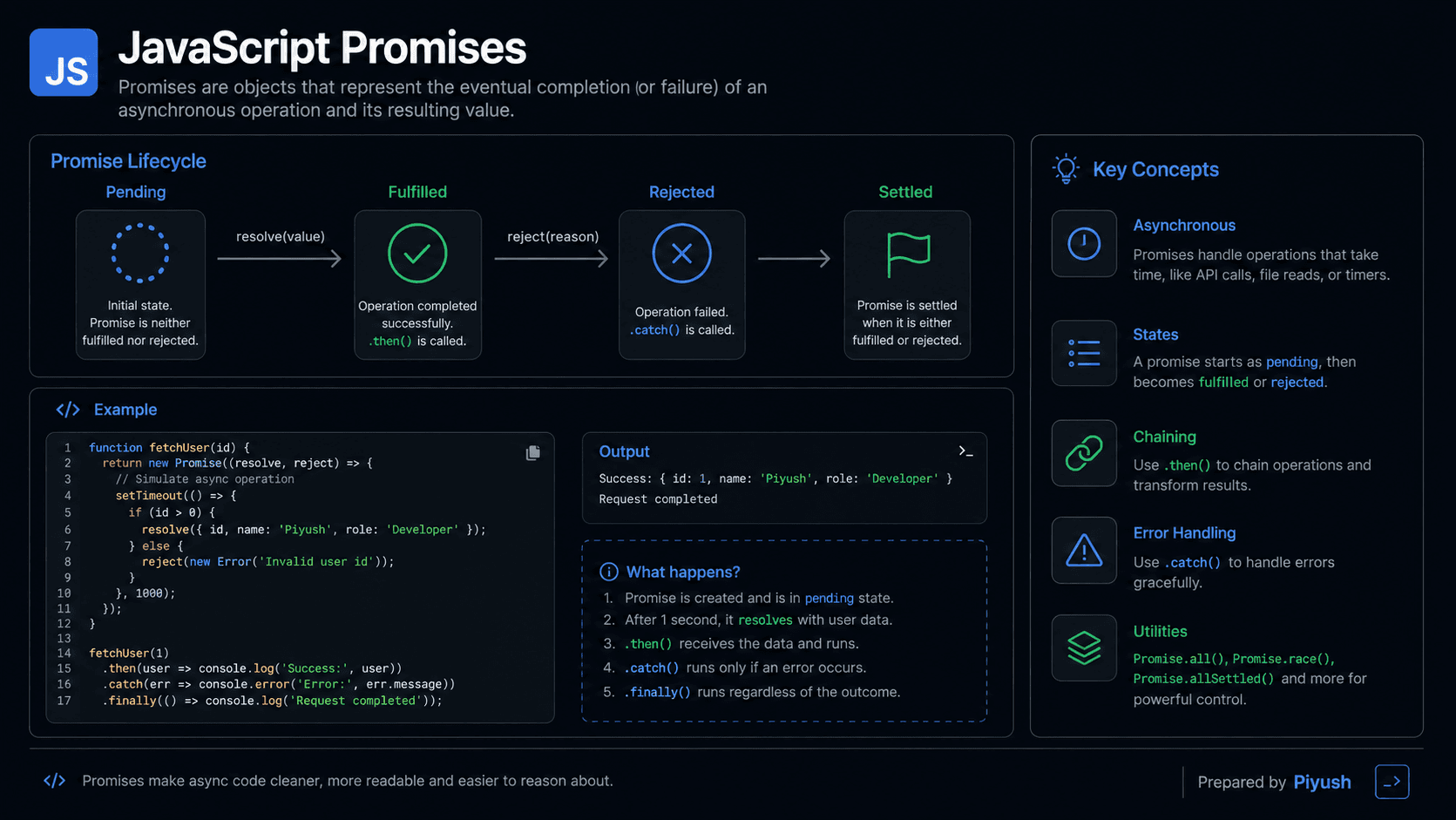
Ever called an API and needed the rest of your code to wait until the response came back? That's exactly the problem JavaScript Promises solve. A Promise represents a result that isn't ready yet, which makes asynchronous work far easier to organize, combine, and handle.
You'll find Promises everywhere in modern JavaScript: fetch(), database clients, file operations, and most application frameworks lean on them. Learn how they work and async/await will feel like a natural next step rather than a new topic.
What You'll Learn About JavaScript Promises
This guide walks through the Promise lifecycle, chaining, error handling, runtime behavior, and the patterns you'll actually reach for in production.
- Why JavaScript Promises were introduced
- How pending, fulfilled, and rejected states work
- How to chain asynchronous operations
- How the event loop schedules Promise handlers
- Common Promise mistakes and best practices
- How to combine multiple Promises safely
Prerequisites for Learning Promises
Promises click faster once you're comfortable with functions, callbacks, and the JavaScript event loop.
Review these foundational topics if they are unfamiliar:
You can also test your basics:
Why Do JavaScript Promises Exist?
Promises exist to make asynchronous work easier to manage. Before they arrived, the usual approach was to pass callback functions into other functions. String a few dependent operations together and you ended up with deeply nested code, error handling scattered in every layer, and the tangle people call "callback hell." A Promise replaces all of that with a single object that stands in for a future result.
Without them, you'd still be nesting callbacks for network requests, timers, file operations, and database queries. Coordinating even a handful of operations would mean tracking counters by hand and checking for errors at every step.
Promises introduced a predictable way to:
- connect asynchronous steps
- pass results between operations
- centralize error handling
- run independent operations together
- separate the operation from its consumers
One thing they don't do is make asynchronous work finish faster. What they change is how easily you can reason about the result and the flow of control around it.
A Mental Model for JavaScript Promises
The easiest way to picture a Promise is as a numbered token for work that hasn't finished yet.
Imagine ordering food at a busy restaurant. You receive a token immediately instead of waiting at the counter. The token is not your meal, but it represents the meal you should receive later.
At first, your order is pending. When it is ready, the order is fulfilled, and the token gives you the meal. If the kitchen cannot prepare it, the order is rejected, and you receive a reason.
You can decide in advance what to do when either result occurs. You might eat the meal when it arrives or choose another option if the order fails. A JavaScript Promise works the same way: it represents an eventual outcome and lets you register reactions without blocking the rest of the program.
The key point: your program gets the Promise right away. The value it stands for may show up later.
A Real-Life Promise Analogy
Booking a taxi through an app works the same way. The confirmation you get is a stand-in for a future ride, and you can keep getting ready while the driver heads toward you.
The booking eventually succeeds when the driver arrives, or fails when none is available. You don't keep checking the app for an answer; it notifies you once the booking settles.
JavaScript does the same thing: you attach handlers to a Promise, and it runs them once the asynchronous operation succeeds or fails.
How to Recognize Promises in Real Code
Promise-based code usually gives itself away through methods like .then(), .catch(), or .finally(). You might also spot new Promise(), Promise.all(), Promise.race(), or functions declared with async, which always return Promises.
Common production examples include:
fetch()requests- database queries
- file-system operations
- authentication workflows
- dynamic module imports
- timers wrapped in Promise-based utilities
- parallel API requests
asyncandawaitexpressions
A function tends to return a Promise when it can't produce its result on the spot. Variable names like requestPromise are a hint, but the clearest signal is the documentation or a return type such as Promise<User> in TypeScript.
If a value supports .then() and represents an eventual result, it is likely a Promise or another “thenable” object.
What Is a JavaScript Promise?
A JavaScript Promise is an object that represents the eventual result of an asynchronous operation. It starts out pending, then becomes fulfilled with a value or rejected with a reason. You attach then, catch, and finally handlers to it to compose asynchronous steps and deal with failures, all without the nested callbacks of old.
Here's a simple example:
const deliveryPromise = new Promise((resolve) => {
  setTimeout(() => {
    resolve("Package delivered");
  }, 1000);
});

deliveryPromise.then((message) => {
  console.log(message);
  // Expected output after 1 second: Package delivered
});
The executor function you pass to new Promise() runs immediately. Calling resolve() settles the Promise successfully, yet the attached .then() handler still runs asynchronously, after the current code finishes.
How Do JavaScript Promises Work?
A Promise starts pending and settles exactly once. Calling resolve() fulfills it with a value; calling reject() rejects it with a reason. Any handlers you registered are scheduled to run later, and every call to .then(), .catch(), or .finally() returns a brand-new Promise.
Create the Promise
JavaScript creates a pending Promise and immediately executes the function passed to its constructor.
Start the operation
The executor can start a timer, network request, or another task that will finish later.
Settle the Promise
Calling resolve(value) fulfills the Promise. Calling reject(reason) rejects it. Later attempts to settle it are ignored.
Schedule the handlers
JavaScript places matching Promise reactions, such as a then or catch callback, in the microtask queue.
Create the next result
Each handler produces a new Promise, allowing additional asynchronous steps to be chained.
The three Promise states are:
| State | Meaning | Can it change? |
|---|---|---|
| Pending | The operation has not settled | Yes |
| Fulfilled | The operation succeeded with a value | No |
| Rejected | The operation failed with a reason | No |
A fulfilled or rejected Promise is called settled.
A Promise can be fulfilled with any value. If it is resolved with another Promise or a thenable, it adopts that object's eventual state.
Think Like the JavaScript Engine
Behind the scenes, the runtime juggles synchronous code, external operations, and Promise microtasks, all without blocking the main call stack.
-
An execution context is created.
When JavaScript reachesnew Promise(), it creates the Promise object in memory and invokes the executor synchronously. -
The executor enters the call stack.
Variables declared inside it belong to its lexical environment. Nested callbacks can access surrounding variables through the scope chain. -
External work is delegated.
A browser may handle a timer through Web APIs or perform a network request outside the JavaScript call stack. -
The Promise is settled.
When the operation completes,resolve()orreject()records the result. The Promise cannot move to another state afterward. -
Handlers enter the microtask queue.
Promise reactions are microtasks. They run after the current call stack becomes empty and before the runtime processes the next regular task. -
A handler produces another Promise.
A returned value fulfills the next Promise. A thrown error rejects it. Returning another Promise makes the chain wait for that result. -
Unused data may be collected.
Once a Promise, its handlers, and referenced variables are unreachable, garbage collection can reclaim their memory.
This ordering is why Promise handlers always run after the synchronous statements around them:
console.log("First");

Promise.resolve().then(() => {
  console.log("Third");
});

console.log("Second");

// Expected output:
// First
// Second
// Third
Promise Chaining, Values, and Errors
Chaining connects asynchronous steps by returning a new Promise from every handler. Return a plain value and the next Promise fulfills with it. Return a Promise and the chain waits for it. Throw an error and the next Promise rejects.
Promise.resolve(5)
  .then((number) => number * 2)
  .then((number) => {
    console.log(number);
    // Expected output: 10
    return number + 1;
  })
  .then((number) => {
    console.log(number);
    // Expected output: 11
  });
Rejections move through the chain until a rejection handler processes them:
Promise.reject(new Error("Payment failed"))
  .then(() => {
    console.log("This does not run");
  })
  .catch((error) => {
    console.error(error.message);
    // Expected output: Payment failed
  })
  .finally(() => {
    console.log("Payment attempt finished");
    // Expected output: Payment attempt finished
  });
finally() is handy for cleanup, like hiding a loading spinner whether the operation succeeded or failed. Its callback doesn't receive the fulfillment value or the rejection reason, since it runs either way.
Practical JavaScript Promise Examples
Promises earn their keep when they represent real asynchronous work, not values you already have on hand synchronously.
Fetching and Validating API Data
The fetch() function returns a Promise. It rejects on network failures, but an HTTP error like 404 still counts as a "successful" response as far as fetch() is concerned, so you have to check for it yourself.
function fetchUser(userId) {
  return fetch(`https://jsonplaceholder.typicode.com/users/${userId}`)
    .then((response) => {
      if (!response.ok) {
        throw new Error(`Request failed with status ${response.status}`);
      }

      return response.json();
    });
}

fetchUser(1)
  .then((user) => {
    console.log(user.name);
  })
  .catch((error) => {
    console.error("Could not load user:", error.message);
  });
Running Independent Operations Together
Promise.all() waits for every input Promise and hands back the results in the same order you passed them in, regardless of which finished first. If any single input rejects, the whole thing rejects immediately.
function delay(milliseconds, value) {
  return new Promise((resolve) => {
    setTimeout(() => resolve(value), milliseconds);
  });
}

const profilePromise = delay(500, { name: "Mina" });
const settingsPromise = delay(800, { theme: "dark" });

Promise.all([profilePromise, settingsPromise]).then(
  ([profile, settings]) => {
    console.log(profile.name, settings.theme);
    // Expected output after about 800ms: Mina dark
  }
);Start independent operations before awaiting or chaining their results. Then combine them with Promise.all() to avoid unnecessary sequential waiting.
Choosing the Right Promise Combinator
| Method | Settles when | Typical use |
|---|---|---|
Promise.all() | All fulfill, or one rejects | Require every result |
Promise.allSettled() | Every input settles | Collect successes and failures |
Promise.race() | First input settles | Use the earliest outcome |
Promise.any() | First input fulfills | Use the first successful result |
Common Mistakes in JavaScript Promises
Most Promise bugs trace back to the same few habits: forgetting to return a Promise, misreading how errors propagate, or kicking off asynchronous work that nothing ever waits for.
Forgetting to Return from a Promise Chain
Common mistake: A block-bodied arrow function must explicitly return the next Promise. Otherwise, the following handler receives undefined and runs without waiting.
getUser()
  .then((user) => {
    fetchOrders(user.id); // Not returned
  })
  .then((orders) => {
    console.log(orders); // undefined
  });
Using forEach() with Asynchronous Callbacks
forEach() does not wait for Promises returned by its callback.
// ❌ Wrong: completion is not awaited
items.forEach(async (item) => {
  await saveItem(item);
});

// ✅ Correct: wait for all save operations
await Promise.all(items.map((item) => saveItem(item)));
Wrapping an Existing Promise Unnecessarily
// ❌ Wrong: redundant Promise construction
function loadUser() {
  return new Promise((resolve, reject) => {
    fetchUser(1).then(resolve).catch(reject);
  });
}

// ✅ Correct: return the existing Promise
function loadUser() {
  return fetchUser(1);
}
Catching an Error Without Recovering or Rethrowing
A .catch() handler that returns normally converts the rejection into a fulfilled Promise.
fetchUser(1)
  .catch((error) => {
    console.error(error);
    throw error; // Keep the chain rejected
  });
JavaScript Promise Best Practices
Good Promise code leaves no doubt about who owns the result, what happens on failure, and in what order things run.
- Return Promises from asynchronous functions.
- End chains with
.catch()when no caller will handle the rejection. - Throw
Errorobjects instead of strings. - Keep chains flat by returning nested Promises.
- Use
Promise.all()only when every result is required. - Use
Promise.allSettled()when partial failure is acceptable. - Prefer
asyncandawaitfor readable sequential workflows, while understanding that they still use Promises.
Reach for new Promise() only when you're wrapping a callback-based API or need direct control over when something settles. Most Promise-based APIs can simply be returned as they are.
Promises vs Callbacks vs Async/Await
Promises and async/await give you standard, built-in composition and error propagation. Callbacks leave those details up to whatever function you handed the callback to, which is why they're harder to compose.
| Approach | Readability | Error handling | Composition |
|---|---|---|---|
| Callbacks | Can become nested | Often manual | Difficult for multiple operations |
| Promises | Chain-based | .catch() | Strong combinator support |
async/await | Reads sequentially | try...catch | Built on Promises |
async and await don't replace Promises. They're just cleaner syntax for consuming and returning them.
Real-World Uses of JavaScript Promises
Anytime an application has to react to a result that may arrive later, Promises are usually the tool doing the work.
Common production uses include:
- loading API data for dashboards
- submitting forms and processing payments
- checking authentication tokens
- uploading files
- reading files in Node.js
- querying databases
- lazy-loading application modules
- coordinating several service requests
- adding retry and timeout behavior
Promises are also central to React data loading, Next.js server operations, test frameworks, and modern JavaScript SDKs.
JavaScript Promise Interview Questions
These come up often in interviews because they test both the syntax and a real grasp of how asynchronous execution works.
Frequently Asked Questions About Promises
Short answers to the questions developers most often run into while learning Promises.
Related JavaScript Topics and Quizzes
Keep going with the concepts that build directly on what you just learned about Promises.
Learn how async functions and await provide cleaner syntax for working with Promises.
🔑 Key Takeaways
JavaScript Promises give you one standard way to represent, combine, and handle asynchronous results.
- A Promise starts pending and becomes fulfilled or rejected.
- A settled Promise cannot change state again.
then(),catch(), andfinally()return new Promises.- Promise handlers run through the microtask queue.
- Return each asynchronous operation when building a chain.
- Choose Promise combinators based on how failures should be handled.
Test Your JavaScript Promise Knowledge
Can you predict Promise output order, repair a broken chain, and choose the correct combinator?