JavaScript Lexical Environment: How Scope Chains Work
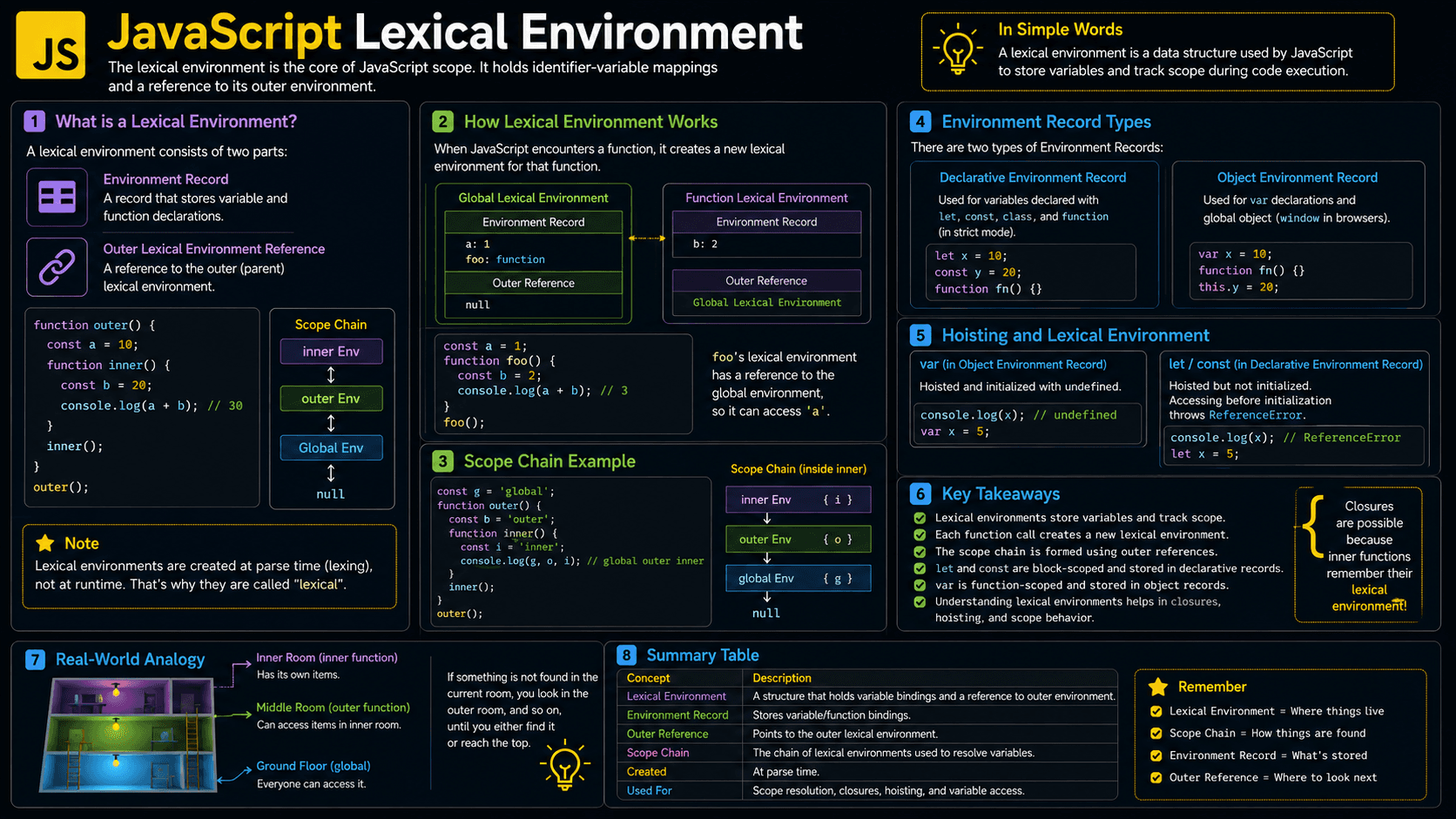
Ever wondered how a JavaScript function reaches a variable that was declared outside it? The answer is the lexical environment — the internal structure JavaScript uses to store variables and connect each scope to the one around it.
This one mechanism powers variable lookup, nested functions, block scope, and closures. Once it clicks, a lot of "surprising" JavaScript behavior stops being surprising.
const appName = "Quiz Platform";

function greet() {
  // `appName` isn't local — the lexical environment
  // links this function to the scope around it.
  console.log(appName);
}

greet();
// Quiz Platform
What You'll Learn
- Why JavaScript needs lexical environments
- How variables are stored and resolved
- How lexical environments form a scope chain
- What happens when functions and blocks execute
- How closures preserve access to outer variables
- Common mistakes involving scope and variable lookup
Prerequisites for Learning Lexical Environments
A working knowledge of functions, variables, and scope will make this topic much easier to follow.
Review these foundations if they are unfamiliar:
You can also test your foundation:
Why Does Lexical Environment Exist?
Lexical environments give JavaScript a predictable way to decide which variable an identifier points to. Without them, nested functions couldn't reliably reach surrounding variables, and you'd be stuck leaning on global variables or threading every value through function parameters.
Older approaches sometimes tied variable access to the runtime call path, which made behavior hard to trace. Lexical scope takes a simpler route: access is decided by where the code is written, not by how it's called.
That single decision solves several practical problems:
- Functions can use variables from their surrounding code.
- Separate blocks can safely declare variables with the same name.
- Inner functions can preserve private state.
- JavaScript can resolve names consistently.
- Developers can organize code without placing everything in global scope.
You never create a lexical environment by hand. It's part of the underlying model JavaScript engines use to implement scope.
A Beginner-Friendly Mental Model
Picture a lexical environment as a labeled room full of variables, with a doorway leading to the room around it. When JavaScript needs a variable, it searches the current room first. If it's not there, JavaScript steps through the doorway and searches the outer room.
Imagine that every function and block enters a room with its own set of labeled storage boxes. Each box holds a variable.
A room also has a sign pointing to the room in which it was created. If someone asks for a box that is not in the current room, JavaScript follows the sign and checks the next room. This continues until the box is found or there are no rooms left.
Here's the key detail: the signs point based on where the code was written, not where a function gets called. A returned function keeps its sign too, so it can revisit an outer room long after that room seemed "closed." That retained connection is exactly what makes closures possible.
Technically, the “room” is a lexical environment, while the connected rooms form the scope chain.
A Real-Life Analogy for Lexical Scope
Think of an employee looking for a document. They first check their desk, then their department cabinet, and finally the company archive.
They don't go rummaging through an unrelated department just because someone from there asked them for the file. Their search path follows where they sit in the organization. JavaScript resolves variables the same way — by structure, not by who called.
What Is a Lexical Environment in JavaScript?
A lexical environment is an internal JavaScript structure that associates variable and function names with their values. It also stores a reference to its outer environment. JavaScript follows these references during variable lookup, creating the scope chain used by functions, blocks, and closures.
Each lexical environment has two conceptual parts:
| Part | Purpose |
|---|---|
| Environment record | Stores bindings such as variables, functions, and parameters |
| Outer environment reference | Points to the surrounding lexical environment |
“Lexical” means that the relationship between scopes is determined by the physical placement of code in the source file.
How Does a Lexical Environment Work?
A lexical environment stores the bindings for the scope that's currently running and links that scope to its parent. When your code references a variable, JavaScript checks the current environment first, then follows outer-environment references until it either finds the binding or runs out of scope chain.
Here's that in action:
const applicationName = "Quiz Platform";

function showLesson() {
  const lessonName = "Lexical Environment";

  console.log(`${applicationName}: ${lessonName}`);
}

showLesson();
// Quiz Platform: Lexical EnvironmentCreate the global environment
JavaScript creates a binding for applicationName and another for showLesson.
Call the function
Calling showLesson() creates a function execution context with a new lexical environment.
Store the local binding
The function environment stores the lessonName binding.
Resolve variable names
JavaScript finds lessonName locally. It cannot find applicationName there, so it searches the outer global environment.
Finish execution
The function returns, and its execution context leaves the call stack.
The lookup path can be visualized as:
showLesson environment
├── lessonName: "Lexical Environment"
└── outer → global environment
             ├── applicationName: "Quiz Platform"
└── showLesson: functionMemorable rule: JavaScript searches from the innermost scope outward. It never searches inward from an outer scope.
Think Like the JavaScript Engine
Behind the scenes, the engine juggles execution contexts, lexical environments, the call stack, and memory. Here's roughly how that plays out:
-
JavaScript analyzes the source structure.
The placement of functions and blocks determines their lexical relationships. -
The global execution context is created.
Its lexical environment contains global declarations and has no outer environment. -
A function call adds an execution context to the call stack.
The new context receives a lexical environment containing parameters, local variables, and declarations. -
Bindings are initialized according to declaration rules.
Function declarations are available early, whileletandconstremain uninitialized during the temporal dead zone. -
Identifier lookup begins locally.
If a binding is absent, the engine follows the outer reference through the scope chain. -
Functions remember their creation environment.
A function stores an internal reference to the lexical environment where it was defined. -
Garbage collection removes unreachable data.
An environment can remain in memory when a reachable closure still depends on it. Once nothing can reach it, it becomes eligible for collection.
JavaScript engines may optimize how environments are stored. The lexical environment model describes observable behavior rather than requiring one specific memory layout.
Core Parts of JavaScript Lexical Environments
The same connected-environment model explains global scope, function scope, block scope, shadowing, and closures. Let's walk through each one.
Global Lexical Environment
The global environment is created the moment a script starts. It holds your global declarations and acts as the last stop for many variable lookups — if a name isn't found here, it isn't found at all.
const language = "JavaScript";

function printLanguage() {
  console.log(language);
}

printLanguage();
// JavaScript
Function Lexical Environment
Every function call spins up its own environment for that specific invocation. Parameters and local declarations live there.
function calculateTotal(price, quantity) {
  const total = price * quantity;
  return total;
}

console.log(calculateTotal(20, 3));
// 60
Separate calls get separate environments, so their local values never step on each other.
Block Lexical Environment
Blocks create lexical scope for let, const, and class.
const status = "outside";

if (true) {
  const status = "inside";
  console.log(status); // inside
}

console.log(status); // outside
The inner status shadows the outer one — it hides it inside the block without changing it.
Scope Chain and Variable Lookup
When several variables share a name, JavaScript picks the nearest one it can reach.
const message = "global";

function outer() {
  const message = "outer";

  function inner() {
    const message = "inner";
    console.log(message);
  }

  inner();
}

outer();
// inner
The lookup stops as soon as message is found in the innermost environment.
Lexical Environment Examples
These examples build up from a simple outer-variable lookup to closures that hold private state.
Beginner Example: Accessing an Outer Variable
const courseName = "JavaScript Fundamentals";

function displayCourse() {
  console.log(courseName);
}

displayCourse();
// JavaScript Fundamentals
displayCourse can access courseName because its environment points to the global environment.
Practical Example: Configured Formatter
function createPriceFormatter(currencySymbol) {
  return function formatPrice(amount) {
    return `${currencySymbol}${amount.toFixed(2)}`;
  };
}

const formatDollars = createPriceFormatter("$");
const formatEuros = createPriceFormatter("€");

console.log(formatDollars(19.5)); // $19.50
console.log(formatEuros(25)); // €25.00
Each returned function keeps access to its own currencySymbol, even after createPriceFormatter has finished running. That's a closure, built straight from lexical environments.
Advanced Example: Private State
function createScoreTracker(initialScore = 0) {
  let score = initialScore;

  return {
    increase(points) {
      score += points;
      return score;
    },
    getScore() {
      return score;
    }
  };
}

const tracker = createScoreTracker(10);

console.log(tracker.increase(5)); // 15
console.log(tracker.getScore()); // 15
Nothing outside createScoreTracker can touch score directly. Only the returned methods reach into that environment, which is how you get truly private state.
How to Recognize Lexical Environments in Real Code
Lexical environments show up any time code reaches for variables from a surrounding scope. You'll never see a LexicalEnvironment keyword — engines build these structures internally — so you learn to spot them by pattern instead.
Watch for things like:
- Nested functions reading outer variables
- Functions returned from factory functions
- Event handlers using surrounding configuration
- Callbacks passed to
map,filter, or asynchronous APIs - Module-level variables shared by exported functions
- Private state implemented with closures
- React components and hooks referencing props or state
letandconstdeclarations inside loops or blocks
The clearest tell is a function that still needs an outer variable after its surrounding function has already returned. That's a closure, kept alive by a retained lexical environment.
Lexical Environment vs Scope, Context, and Closure
These terms travel together, but each one describes a different piece of the picture.
| Concept | Meaning |
|---|---|
| Lexical environment | Runtime structure containing bindings and an outer reference |
| Scope | Rules describing where a binding can be accessed |
| Scope chain | Linked path JavaScript searches during variable lookup |
| Execution context | Runtime state for currently executing global or function code |
| Closure | A function combined with access to its creation environment |
Use scope when discussing visibility, lexical environment when discussing storage and lookup, and closure when a function preserves outer access.
Common Lexical Environment Mistakes
Most bugs in this area trace back to four misunderstandings: where a function was called, how shadowing works, how loop declarations behave, and what closures keep in memory. Here's each one.
Mistake 1: Assuming the Call Site Controls Scope
Common mistake: A function uses the environment where it was defined, not the environment from which it was called.
❌ Wrong assumption:
const label = "global";

function printLabel() {
  console.log(label);
}

function runTask() {
  const label = "local";
  printLabel();
}

runTask();
// global, not local
✅ Correct approach when the value should be configurable:
function printLabel(label) {
  console.log(label);
}

function runTask() {
  const label = "local";
  printLabel(label);
}

runTask();
// local
Mistake 2: Using var in Asynchronous Loops
var creates a single function-scoped binding, so every callback ends up reading the same final value.
❌ Wrong:
for (var index = 0; index < 3; index += 1) {
  setTimeout(() => {
    console.log(index);
  }, 0);
}

// 3
// 3
// 3
✅ Correct:
for (let index = 0; index < 3; index += 1) {
  setTimeout(() => {
    console.log(index);
  }, 0);
}

// 0
// 1
// 2
let gives each loop iteration its own fresh binding, so each callback captures its own value.
Mistake 3: Accessing a Binding Before Initialization
let and const bindings exist from the start of their block, but they cannot be accessed before their declaration is evaluated. This period is the temporal dead zone.
{
  // console.log(topic); // ReferenceError
  const topic = "Lexical Environment";
  console.log(topic); // Lexical Environment
}
Mistake 4: Retaining Unneeded Data
A closure that sticks around can keep the data it references alive far longer than you'd expect.
function createProcessor(largeDataset) {
  return function processFirstItem() {
    return largeDataset[0];
  };
}

let processor = createProcessor(new Array(100_000).fill("item"));

console.log(processor()); // item

processor = null;
// The closure and retained data can now become eligible for garbage collection.
Best Practices for Predictable Lexical Scope
Clear scope boundaries keep variable lookup easy to reason about and cut down on accidental coupling.
Prefer const by default and use let only when reassignment is required. Avoid var in modern JavaScript unless you specifically need function-scoped behavior.
Additional practices include:
- Keep functions focused and avoid deeply nested scopes.
- Pass values explicitly when hidden dependencies would hurt readability.
- Use descriptive names instead of repeatedly shadowing variables.
- Limit global declarations.
- Use closures for intentional private state, not as a default storage mechanism.
- Remove long-lived event handlers and callbacks when they are no longer needed.
Real-World Uses of Lexical Environments
Production JavaScript leans on lexical environments constantly, even when nobody calls them that. A few places you've almost certainly used them:
- Factory functions: Each created function receives its own configuration.
- Event handlers: Handlers remember nearby DOM elements or application state.
- Module design: Exported functions access private module-level bindings.
- Memoization: A function retains a cache between calls.
- React code: Components and callbacks reference props, state, and variables from a render.
- Asynchronous tasks: Timers and promise callbacks preserve surrounding values.
- Data privacy: Closures expose controlled methods while hiding mutable data.
Lexical Environment Interview Questions
These questions probe whether you actually understand the scope rules, not just a memorized definition.
Frequently Asked Questions About Lexical Environments
Quick answers to the questions that come up most often around scope, functions, memory, and variable declarations.
Related JavaScript Learning Resources
Keep going with scope, closures, and execution contexts to see how lexical environments fit into the bigger picture.
Understand how JavaScript manages function execution and the call stack.
🔑 Key Takeaways
A lexical environment ties bindings to their surrounding scope and gives JavaScript one consistent path for finding variables.
- Every environment stores bindings and an outer-environment reference.
- JavaScript searches for variables from the current scope outward.
- Scope relationships depend on where code is written, not where functions are called.
- Function calls and blocks can create new environments.
- Closures retain access to the environment where a function was created.
- Unreachable environments and closures are eligible for garbage collection.
Test Your Lexical Environment Knowledge
Nothing locks this in faster than practice — tracing scope chains, predicting outputs, and catching closure behavior in the wild.