JavaScript Operators Explained: Types and Examples
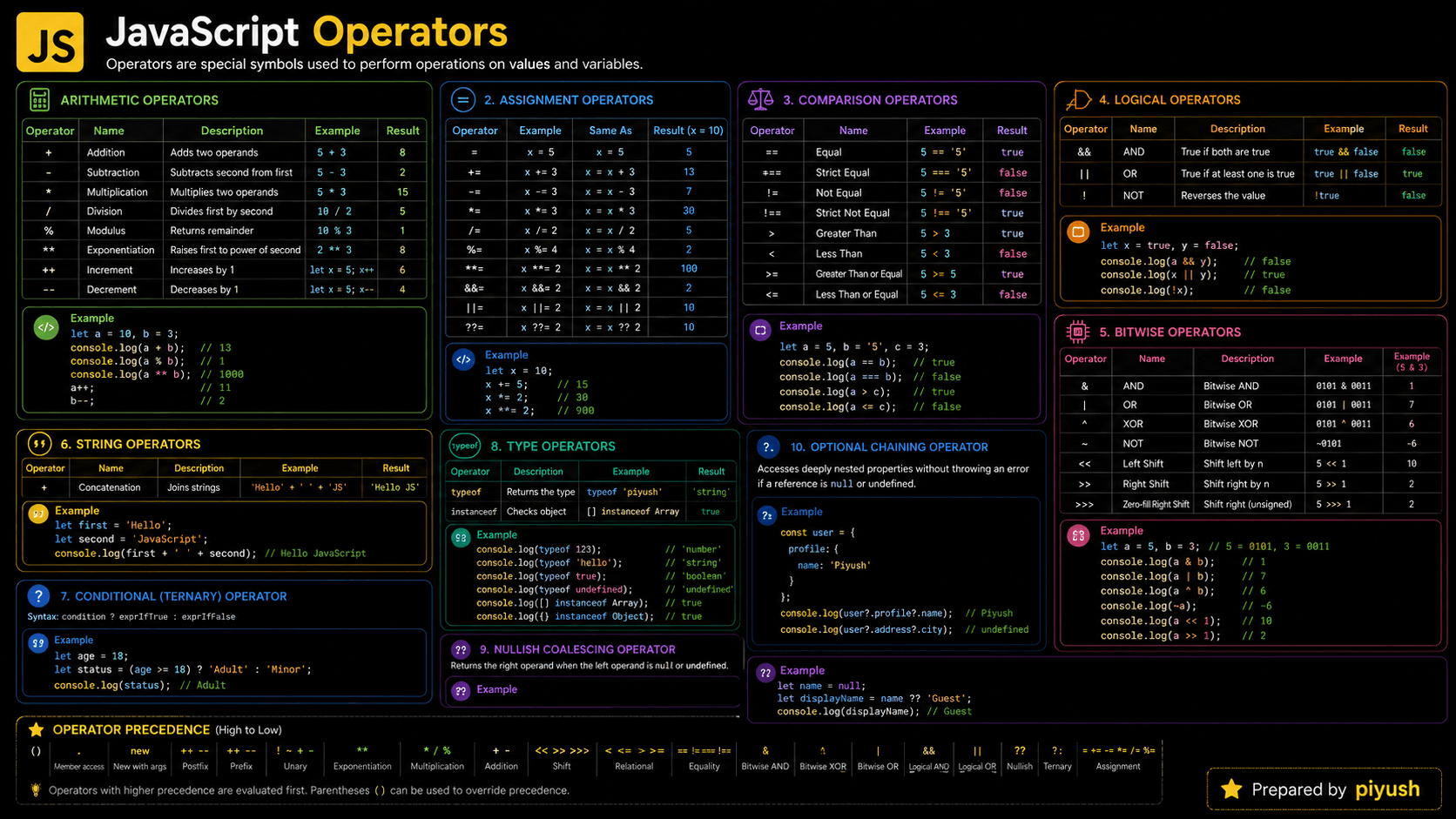
How does JavaScript add up a shopping cart, check a password, or fall back to a default value? Every one of those relies on JavaScript operators — the symbols and keywords that act on your values. They drive calculations, conditions, assignments, and most of the everyday logic you write.
This guide walks through the main operator types, how JavaScript evaluates them, and the common mistakes that quietly produce the wrong result.
const total = itemPrice * quantity; // * is the operatorWhat You'll Learn About JavaScript Operators
- Why programming languages need operators
- How unary, binary, and ternary operators differ
- How arithmetic, comparison, logical, and assignment operators work
- How operator precedence changes an expression
- How JavaScript evaluates operators behind the scenes
- Which operator mistakes commonly cause bugs
Prerequisites for Learning Operators
A basic understanding of variables and JavaScript data types will make the examples easier to follow.
You can also test your basics here:
Why Do JavaScript Operators Exist?
Operators give you a short, consistent way to transform, compare, combine, and assign values. Without them, adding tax to a price would need its own function call. So would every condition — checking equality, ordering numbers, or combining a few rules would each turn into verbose helper functions.
Language designers added operators because these actions show up constantly. Symbols like +, >, and = make familiar operations quick to read and write. Keyword operators like typeof and instanceof answer language-specific questions that plain math symbols cannot.
Operators solve three recurring problems:
- performing calculations
- making decisions from comparisons
- updating and combining data
Operators let you express those intentions directly, instead of writing a separate function for every small step.
A Mental Model for JavaScript Operators
Picture JavaScript operators as small machines on an assembly line. Values go in, the symbol on the machine decides what happens, and a result comes out.
Imagine a row of labeled machines. A + machine combines two values, a > machine checks which value is larger, and a ! machine reverses a yes-or-no result.
Some machines take one input, others need two. The conditional operator takes three parts: a condition, a result for "yes," and a result for "no."
When several machines sit on the same line, JavaScript follows a fixed order — multiplication runs before addition, for instance. Parentheses act like a supervisor, telling JavaScript which operation to run first.
This picture helps you read an expression as a sequence of small operations rather than one tangled instruction.
Technically, the inputs are called operands, while the symbol or keyword performing the action is the operator.
A Real-Life Analogy for Operators
Think about paying at a store. The cashier adds up item prices with +, checks whether your payment covers the total with >=, and approves the purchase based on that check.
Operators do the same jobs inside a program: they calculate values, compare information, and help the app decide what happens next.
What Are JavaScript Operators?
JavaScript operators are symbols or keywords that act on one or more values, called operands. They can calculate numbers, assign values, compare data, combine conditions, inspect types, and pick results. Common examples include arithmetic +, strict equality ===, logical AND &&, assignment =, and the conditional operator ? :.
An expression combines values and operators to produce a result:
const itemPrice = 20;
const quantity = 3;
const total = itemPrice * quantity;

console.log(total); // 60
Here, * is the operator, while itemPrice and quantity are its operands.
How Do JavaScript Operators Work?
An operator evaluates its operands, applies its operation, and returns a result. When an expression holds several operators, the runtime falls back on precedence and associativity rules to decide the order. A few operators — &&, ||, ??, and ?. — can stop evaluating early once the outcome is settled.
Resolve the operands
JavaScript reads literals, variables, property values, or function results used by the expression.
Follow operator precedence
Higher-precedence operations are evaluated before lower-precedence operations unless parentheses change the order.
Apply conversion when required
Some operators convert operands to compatible types. For example, subtraction commonly converts numeric strings to numbers.
Perform the operation
The runtime calculates, compares, assigns, or otherwise processes the operands.
Return the result
The expression produces a value that can be stored, displayed, passed to a function, or used in another expression.
Use parentheses when an expression's evaluation order may not be immediately clear, even if you know the precedence rules.
How to Recognize Operators in Real Code
Operators show up anywhere an app calculates data, checks a condition, or updates state. Watch for symbols like +, ===, &&, ??, ?., and =. Keyword operators include typeof, in, instanceof, and delete.
Common production patterns include:
- price and tax calculations in shopping carts
- comparisons inside
ifstatements - logical operators in React conditional rendering
- optional chaining when reading API responses
- nullish coalescing for configuration defaults
- assignment operators when updating counters
instanceofchecks in error handlingtypeofchecks when validating unknown input
A line doesn't have to look mathematical to contain an operator. Property access, type inspection, and value assignment are all operator-driven too.
Core JavaScript Operator Types
The first way to sort operators is by how many operands they take.
| Form | Operand count | Example | Meaning |
|---|---|---|---|
| Unary | One | !isActive | Negates one value |
| Binary | Two | price * quantity | Operates on two values |
| Ternary | Three parts | age >= 18 ? "Adult" : "Minor" | Selects one of two results |
Arithmetic Operators
Arithmetic operators perform numeric calculations.
| Operator | Purpose | Example |
|---|---|---|
+ | Addition | 5 + 2 → 7 |
- | Subtraction | 5 - 2 → 3 |
* | Multiplication | 5 * 2 → 10 |
/ | Division | 5 / 2 → 2.5 |
% | Remainder | 5 % 2 → 1 |
** | Exponentiation | 5 ** 2 → 25 |
++ | Increment | count++ |
-- | Decrement | count-- |
The + operator also joins strings:
const firstName = "Maya";
const greeting = "Hello, " + firstName;

console.log(greeting); // "Hello, Maya"
Assignment Operators
Assignment operators store or update values.
let score = 10;

score += 5; // Same as: score = score + 5
score *= 2; // Same as: score = score * 2

console.log(score); // 30
Common assignment operators include =, +=, -=, *=, /=, &&=, ||=, and ??=.
Comparison Operators
Comparison operators return a Boolean value: true or false.
const userAge = 21;

console.log(userAge >= 18); // true
console.log(userAge === 21); // true
console.log(userAge !== 30); // true| Operator | Meaning |
|---|---|
=== | Strict equality |
!== | Strict inequality |
== | Loose equality with type conversion |
!= | Loose inequality with type conversion |
> | Greater than |
< | Less than |
>= | Greater than or equal |
<= | Less than or equal |
Prefer === and !== for predictable comparisons. They compare values without first coercing both operands to the same type.
Logical Operators
Logical operators combine or flip conditions. Note that && and || return one of the operand values, not always a Boolean.
const isSignedIn = true;
const hasSubscription = false;

console.log(isSignedIn && hasSubscription); // false
console.log(isSignedIn || hasSubscription); // true
console.log(!isSignedIn); // false
They also rely on short-circuit evaluation:
&&stops at the first falsy operand.||stops at the first truthy operand.??stops at the first value that is notnullorundefined.
Nullish Coalescing and Optional Chaining
Modern JavaScript gives you two concise operators for working safely with missing data.
const user = {
  profile: {
    displayName: ""
  }
};

const displayName = user.profile?.displayName ?? "Guest";

console.log(displayName); // ""
Optional chaining ?. stops as soon as the value before it is null or undefined. Nullish coalescing ?? reaches for its fallback only when the left side is one of those two nullish values — here displayName is an empty string, so it stays.
Conditional Operator
The conditional operator is the only JavaScript operator with three operands.
const orderTotal = 75;
const shipping = orderTotal >= 50 ? "Free" : "$5";

console.log(shipping); // "Free"
Reach for it when you're picking between two short values, not when you're packing in blocks of application logic.
Type and Relationship Operators
JavaScript also has operators for inspecting values and object relationships.
const settings = { theme: "dark" };
const createdAt = new Date();

console.log(typeof settings); // "object"
console.log("theme" in settings); // true
console.log(createdAt instanceof Date); // truetypeof null returns "object". This is a long-standing JavaScript behavior, not evidence that null is a normal object.
Think Like the JavaScript Engine
When the engine evaluates an operator expression, it first resolves the values in the current execution context, then applies the language's evaluation rules.
-
An execution context is active.
Global code or a function runs in an execution context placed on the call stack. -
Identifiers are resolved.
For an expression such asprice * quantity, JavaScript looks for each variable in the current lexical environment. -
The scope chain is checked if needed.
If a variable is not local, JavaScript searches outer lexical environments until it finds the binding or throws aReferenceError. -
Operands are evaluated in the required order.
Precedence groups the expression, while associativity resolves operators with the same precedence. -
Conversions may occur.
The engine follows operator-specific coercion rules before producing the result. -
The result is returned or assigned.
Assignment updates a variable binding or object property. Temporary values can later become eligible for garbage collection when no references remain.
Operators don't create a new scope on their own. Their operands can call functions, though, and each of those calls adds a new execution context to the call stack.
Operator Precedence and Associativity
Precedence decides which operation gets grouped first. Associativity settles the grouping when two operators share the same precedence.
const resultWithoutParentheses = 2 + 3 * 4;
const resultWithParentheses = (2 + 3) * 4;

console.log(resultWithoutParentheses); // 14
console.log(resultWithParentheses); // 20
Multiplication outranks addition, so 3 * 4 is grouped first in the version without parentheses.
Assignment is right-associative:
let firstValue;
let secondValue;

firstValue = secondValue = 10;

console.log(firstValue, secondValue); // 10 10Do not treat precedence knowledge as a readability test. Parentheses make important grouping decisions visible to everyone maintaining the code.
Practical Operators Example: Calculating an Order
A checkout calculation pulls together arithmetic, comparison, logical, and conditional operators in one place.
const itemPrice = 30;
const quantity = 2;
const couponDiscount = 10;
const isMember = true;

const subtotal = itemPrice * quantity;
const memberDiscount = isMember ? 5 : 0;
const finalTotal = subtotal - couponDiscount - memberDiscount;
const qualifiesForFreeShipping = finalTotal >= 50;

console.log(finalTotal); // 45
console.log(qualifiesForFreeShipping); // false
Each operator carries one business rule, which keeps the calculation easy to read and test.
Advanced Example: Safe Configuration Defaults
The gap between || and ?? really shows up when a valid value happens to be falsy.
const applicationConfig = {
  retryCount: 0,
  label: ""
};

const retryCount = applicationConfig.retryCount ?? 3;
const label = applicationConfig.label ?? "Untitled";
const timeout = applicationConfig.network?.timeout ?? 5000;

console.log(retryCount); // 0
console.log(label); // ""
console.log(timeout); // 5000
0 and "" survive here because neither is null or undefined — exactly the values ?? is designed to respect.
Common Mistakes with JavaScript Operators
Most operator bugs trace back to three things: coercion, unclear precedence, or a logical operator that treats a valid value as if it were missing.
Mistaking Assignment for Comparison
A single = assigns a value. It does not compare two values.
let status = "pending";

if (status = "complete") {
  console.log("Order complete");
}

// Prints "Order complete" and changes status
Relying on Loose Equality
console.log(0 == false); // true
console.log(0 === false); // false
Loose equality quietly converts types, which can mask a data-quality problem. Strict equality forces you to be explicit about the type you expect.
Replacing Valid Falsy Values with Defaults
The || operator treats 0, "", false, NaN, null, and undefined as falsy. Use ?? when only missing values should trigger a fallback.
const savedVolume = 0;

const wrongVolume = savedVolume || 50;
const correctVolume = savedVolume ?? 50;

console.log(wrongVolume); // 50
console.log(correctVolume); // 0
Confusing Prefix and Postfix Increment
let count = 5;

console.log(count++); // 5, then count becomes 6
console.log(++count); // count becomes 7, then prints 7
When you don't need the returned value, put the increment on its own line and skip the confusion entirely.
Best Practices for Using Operators
Prefer strict equality, preserve valid falsy values with ??, and add parentheses whenever grouping could be misunderstood.
- Keep expressions short enough to understand at a glance.
- Use descriptive variable names for intermediate results.
- Avoid nested conditional operators.
- Do not depend on implicit coercion when explicit conversion is clearer.
- Use optional chaining only where data may legitimately be missing.
- Keep side effects such as increments out of complex expressions.
// Clearer than one long expression
const subtotal = price * quantity;
const taxAmount = subtotal * taxRate;
const finalPrice = subtotal + taxAmount;
Real-World Uses of JavaScript Operators
Operators turn up everywhere across frontend, backend, and full-stack JavaScript:
- Form validation: checking required fields and length limits
- React rendering: showing components with conditions
- API processing: safely reading nested response properties
- Authentication: combining role and permission checks
- E-commerce: calculating totals, taxes, and discounts
- Pagination: calculating offsets and page counts
- Configuration: applying defaults with
?? - Error handling: checking errors with
instanceof
const canEditPost =
  user?.isActive === true &&
  (user.role === "admin" || user.id === post.authorId);

console.log(canEditPost); // true or false
JavaScript Operators Interview Questions
Frequently Asked Questions About Operators
Related JavaScript Topics and Quizzes
Understand the coercion rules that affect arithmetic and comparison operators.
🔑 Key Takeaways
- Operators perform actions on values called operands.
- Unary, binary, and ternary describe how many operands an operator uses.
- Prefer
===and!==over loose equality in most application code. - Use
??instead of||when0,false, or""are valid values. - Logical operators can short-circuit and return non-Boolean operands.
- Parentheses make precedence and grouping easier to understand.
Test Your JavaScript Operators Knowledge
You now know how JavaScript runs calculations, compares values, combines conditions, applies defaults, and evaluates complex expressions. The subtle differences between similar operators only really stick once you practice them.