JavaScript Data Types Explained: A Beginner’s Guide
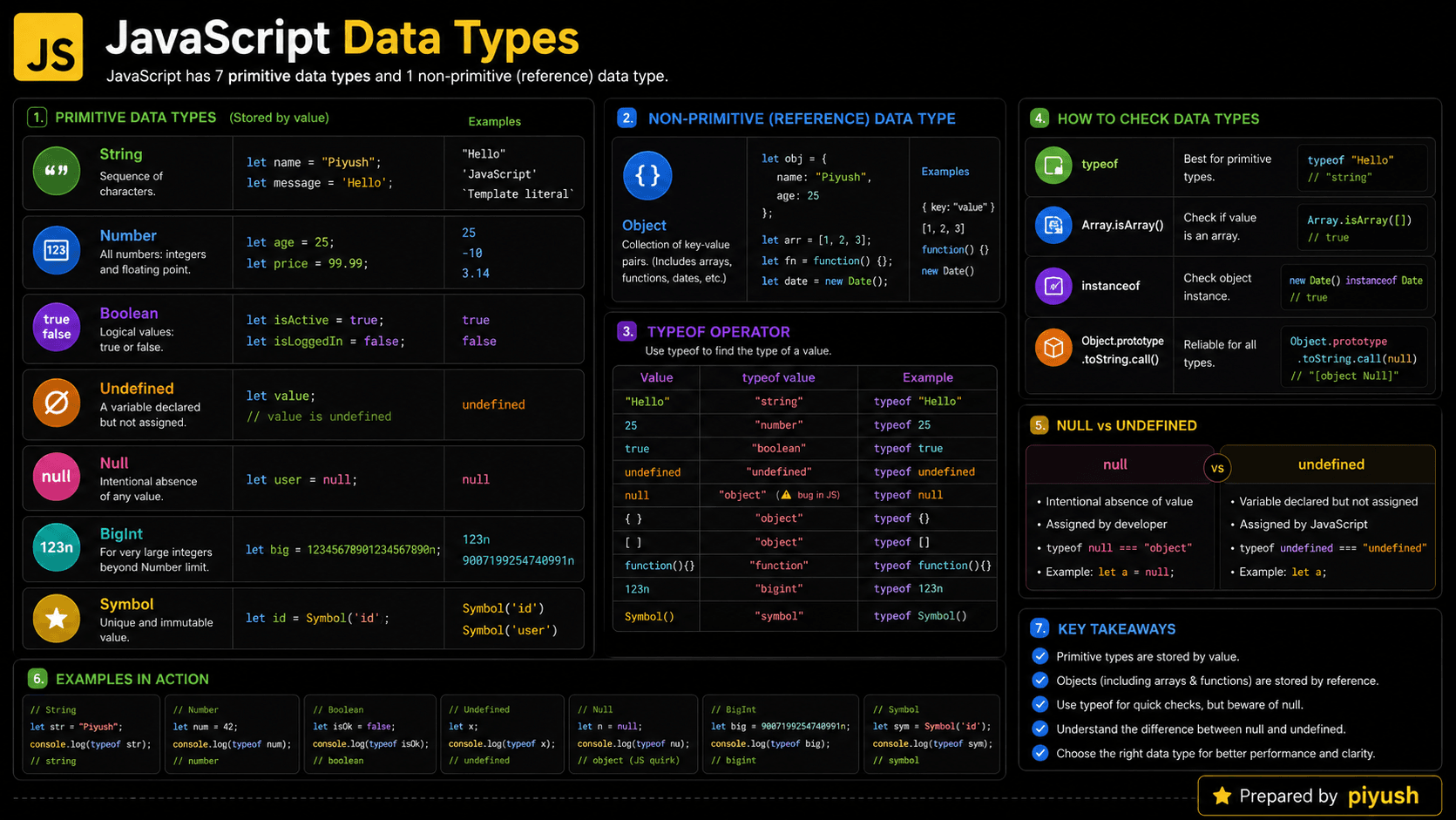
Have you ever wondered why JavaScript treats "10" and 10 differently? The answer lies in JavaScript data types. A value’s type tells the language what it represents: text, a number, a true-or-false condition, an object, or something else entirely.
That single detail shapes almost everything your code does. Calculations, comparisons, form validation, API responses — they all behave differently depending on the types involved.
typeof "10"; // "string"
typeof 10;   // "number"
"10" + 10;   // "1010" — the string wins, so JavaScript joins instead of adds
What You’ll Learn About JavaScript Data Types
By the end of this guide, you’ll be able to identify, compare, and safely work with JavaScript values.
- Why JavaScript needs data types
- The difference between primitive and reference values
- How JavaScript determines a value’s type
- How type coercion changes values
- Common type-checking mistakes
- Practical data type examples
Helpful JavaScript Prerequisites
If you’re comfortable with variables and operators, the examples here will feel familiar. If not, these two guides are worth a quick read first.
You can also test your foundation here:
Why Do JavaScript Data Types Exist?
A program has to know what a value represents before it can use it correctly. Take the characters 25. Are they a number you calculate with, or text you display in a form field? Those two interpretations require completely different behavior.
Without data types, you would have to manually track how every value should be stored, compared, and processed. The runtime would have no idea whether + means "add two numbers" or "join two pieces of text."
JavaScript’s designers went with a dynamically typed system. You don’t declare a fixed type for every variable, but each value still carries a type at runtime. That trade-off keeps small scripts quick to write while still letting JavaScript tell numbers, strings, objects, and functions apart when an operation runs.
A Beginner-Friendly Mental Model for Data Types
So how should you picture this? Think of values as items in labeled containers. A container labeled “number” can be used for arithmetic, while one labeled “string” holds text you can search or join. An “object” container holds a collection of related information.
Picture a delivery warehouse where every package has a category label. Some packages contain numbers, some contain text, and others contain boxes with several smaller items inside.
JavaScript reads a value’s label before deciding what to do with it. If it sees two numbers beside the + operator, it adds them. If one value is text, JavaScript may join the values as text instead.
Variables are more like movable name tags than permanent containers. A name tag can point to a number now and a string later. The value carries the type, not the variable name.
This model explains JavaScript’s dynamic typing: variables can refer to different types as a program runs.
Here’s the distinction that trips people up: JavaScript assigns types to values, not variables. A variable is only a name that points to a value.
A Real-Life Analogy for JavaScript Types
You already work with types every day. Consider a contact form: a person’s name is text, their age is a number, their newsletter choice is true or false, and their complete profile is a collection of related values.
Keeping those categories straight is what stops you from trying to multiply someone’s name or uppercase a newsletter checkbox.
What Are JavaScript Data Types?
JavaScript data types are categories that describe the kind of value a program is working with and the operations that value supports. JavaScript has seven primitive types: string, number, bigint, boolean, undefined, symbol, and null. Everything else — every structured value — belongs to the object type.
Here’s what that looks like in practice:
const username = "Maya";       // string
const score = 95;              // number
const hasPassed = true;        // boolean
const profile = { username };  // object

console.log(typeof score);     // "number"
Notice that typeof score reports the type of the value the variable currently holds. That’s dynamic typing at work.
How Do JavaScript Data Types Work?
Every JavaScript value has a runtime type. When an expression executes, the engine examines its operands, applies the rules for their types, and returns a new value. Sometimes it uses the types as-is; sometimes it performs implicit type coercion when an operation receives mixed kinds of values.
Here’s the lifecycle of a value, step by step:
A value is created
JavaScript evaluates a literal, expression, function result, or external input and produces a value with a type.
A variable refers to the value
A declaration such as const total = 20 creates a binding named total that refers to the number value.
An operation reads the value
When total + 5 runs, JavaScript determines the types of both operands.
JavaScript applies type rules
Two numbers are added. Strings may be concatenated, while mixed values may trigger type coercion.
A result is produced
The expression creates another value, which has its own data type.
Prefer explicit conversion with Number(), String(), and Boolean() when user input or API data may have an unexpected type. It keeps the coercion visible instead of leaving it to JavaScript’s guesswork.
Think Like the JavaScript Engine
It also helps to see this from the engine’s side. When JavaScript evaluates data types, the runtime works through several conceptual steps:
- Create an execution context: Running global code or calling a function creates an environment for its variables and expressions.
- Register variable bindings: Declarations are recorded in a lexical environment. Each binding can refer to a primitive value or an object.
- Resolve names: When JavaScript encounters a variable, it searches the current lexical environment and then follows the scope chain outward.
- Evaluate the operation: The engine checks the operand types and follows rules for arithmetic, comparison, property access, or conversion.
- Store or return the result: The resulting value can be assigned, passed to another function, or returned.
- Reclaim unused memory: Objects that can no longer be reached may be removed by garbage collection.
One caveat: the JavaScript specification doesn’t require primitives to live on a “stack” and objects on a “heap.” Those storage choices are implementation details that vary between engines.
Primitive Types and Objects
With the mechanics in place, let’s map out the types themselves. JavaScript divides values into two broad groups: primitives and objects.
| Category | Data type | Example | typeof result |
|---|---|---|---|
| Primitive | String | "hello" | "string" |
| Primitive | Number | 42, NaN, Infinity | "number" |
| Primitive | BigInt | 9007199254740993n | "bigint" |
| Primitive | Boolean | true | "boolean" |
| Primitive | Undefined | undefined | "undefined" |
| Primitive | Symbol | Symbol("id") | "symbol" |
| Primitive | Null | null | "object" |
| Object | Object | { name: "Maya" } | "object" |
| Object | Array | [1, 2, 3] | "object" |
| Object | Function | function () {} | "function" |
Primitive Values Are Immutable
A primitive value can never be altered internally. Any operation that seems to change one creates a new value instead.
let language = "javascript";
const uppercaseLanguage = language.toUpperCase();

console.log(language);          // "javascript"
console.log(uppercaseLanguage); // "JAVASCRIPT"
Note the difference here: the variable language can be reassigned because it was declared with let, but the original string value itself never changes. toUpperCase() handed back a brand-new string.
Objects Can Hold Mutable Properties
Objects work differently. They group related data, and their properties can usually be changed in place.
const account = {
  username: "maya",
  points: 10
};

account.points += 5;

console.log(account.points); // 15
This surprises many beginners: account uses const, yet its properties remain mutable. const only prevents the variable from being assigned a different object — it says nothing about the object’s contents.
Arrays, dates, regular expressions, maps, sets, and functions are specialized objects. Use dedicated checks when you need to distinguish them.
How Type Checking Works in JavaScript
Knowing the types is half the job. The other half is checking them, and this is where JavaScript gets quirky. The typeof operator handles primitives well, but it doesn’t identify every value precisely.
console.log(typeof "hello");         // "string"
console.log(typeof 100);             // "number"
console.log(typeof true);            // "boolean"
console.log(typeof undefined);       // "undefined"
console.log(typeof 10n);             // "bigint"
console.log(typeof Symbol("id"));    // "symbol"
For null and arrays, reach for more specific checks:
const selectedItems = ["book", "pen"];
const activeUser = null;

console.log(Array.isArray(selectedItems)); // true
console.log(activeUser === null);          // true
Why the special treatment for null? typeof null returns "object" because of a bug in the very first JavaScript engine that was kept for backward compatibility. It does not mean null is an object — it’s a primitive.
How to Recognize Data Types in Real Code
Once you know what to look for, type handling shows up everywhere an application receives, transforms, validates, or displays values. Keep an eye out for typeof, Array.isArray(), strict equality checks, validation functions, and conversion functions such as Number() or String().
Common production examples include:
- Converting HTML form input from strings to numbers
- Validating JSON responses from an API
- Checking whether a React prop is an array or object
- Formatting dates, prices, and boolean settings
- Using BigInt for integers beyond the safe number range
- Creating unique object keys with
Symbol - Guarding function parameters before processing them
TypeScript projects add compile-time type annotations, but runtime checks are still necessary for external data — the compiler can’t vouch for what an API sends back.
Practical JavaScript Data Type Examples
Let’s put all of this to work on three problems you’ll hit in real projects.
Converting Form Input to a Number
HTML input values are strings, even when the field uses type="number". Do the math without converting and you’ll concatenate instead of add.
const priceInput = "24.50";
const quantityInput = "2";

const total = Number(priceInput) * Number(quantityInput);

console.log(total); // 49
Validating an API Response
Never trust external data blindly. Check its shape before your application relies on it.
function getUserDisplayName(response) {
  if (
    response === null ||
    typeof response !== "object" ||
    typeof response.name !== "string"
  ) {
    return "Unknown user";
  }

  return response.name.trim();
}

console.log(getUserDisplayName({ name: " Ada " })); // "Ada"
console.log(getUserDisplayName(null));              // "Unknown user"
The response === null check comes first for a reason: typeof null is "object", so without it, a null response would slip past the object check and crash on response.name.
Using BigInt for Large Integers
Numbers above Number.MAX_SAFE_INTEGER can silently lose integer precision. BigInt exists for exactly this case.
const databaseId = 9007199254740993n;
const nextDatabaseId = databaseId + 1n;

console.log(nextDatabaseId); // 9007199254740994n
One rule to remember: you cannot mix number and bigint operands in arithmetic. Convert them to a compatible type first.
Common Mistakes with JavaScript Data Types
Now for the bugs you’ll actually run into. Type coercion and broad object checks cause most of them.
Common mistake: Values from forms, URL parameters, and many browser APIs arrive as strings. Convert and validate them before performing arithmetic.
Mistaking Concatenation for Addition
❌ Wrong
const itemCount = "5";
const extraItems = 2;

console.log(itemCount + extraItems); // "52"
✅ Correct
const itemCount = "5";
const extraItems = 2;

console.log(Number(itemCount) + extraItems); // 7
Using typeof to Detect Arrays or Null
❌ Wrong
console.log(typeof [] === "array"); // false
console.log(typeof null === "null"); // false
✅ Correct
console.log(Array.isArray([])); // true
console.log(null === null);     // true
Using Loose Equality Without a Clear Reason
❌ Wrong
console.log(0 == false);  // true
console.log("" == false); // true
✅ Correct
console.log(0 === false);  // false
console.log("" === false); // false
Best Practices for Working with Data Types
Avoiding those mistakes comes down to a handful of habits that make program behavior predictable.
Use strict equality by default: === and !== compare values without silently converting their types.
Validate at system boundaries: Check values coming from forms, API responses, local storage, URL parameters, and third-party libraries before using them.
Beyond those two, keep these in your toolkit:
- Use
Number.isNaN(value)to detectNaN. - Use
Array.isArray(value)for arrays. - Check null with
value === null. - Choose descriptive names such as
priceTextandnumericPrice. - Avoid relying on implicit coercion for business logic.
- Remember that
typeof NaNis"number".
JavaScript Type Checking Methods Compared
You’ve now seen several ways to check a type. Each one answers a different question, so here’s how they stack up.
| Method | Best use | Important limitation |
|---|---|---|
typeof value | Primitive types and functions | Returns "object" for null and arrays |
value === null | Exact null check | Only checks null |
Array.isArray(value) | Detecting arrays | Does not identify other objects |
value instanceof Class | Checking a prototype relationship | Can be unreliable across realms |
Number.isNaN(value) | Detecting the numeric NaN value | Does not coerce strings |
Object.prototype.toString.call(value) | More detailed built-in classification | Verbose for everyday checks |
Where JavaScript Data Types Are Used
To tie it together, here’s how data types shape everyday production code:
- E-commerce: numbers represent prices and quantities, while objects represent products.
- Authentication: strings hold tokens and booleans track login state.
- Forms: string input is validated and converted into numbers, dates, or booleans.
- APIs: arrays and objects model JSON responses.
- Databases: identifiers may require strings or BigInt values.
- UI frameworks: component properties and state contain values whose types determine rendering behavior.
In every one of these, choosing and validating the expected type reduces unexpected output and runtime errors.
JavaScript Data Types Interview Questions
These questions come up constantly in interviews, and you now have everything you need to answer them.
Frequently Asked Questions About JavaScript Data Types
Related JavaScript Learning Resources
🔑 Key Takeaways
- JavaScript has seven primitive types and one object type.
- Types belong to values rather than permanently belonging to variables.
- Primitive values are immutable, while object properties are usually mutable.
typeof nullreturns"object"because of historical behavior.- Use
Array.isArray()for arrays and strict equality for predictable comparisons. - Convert and validate form input, API responses, and other external data.
Test Your JavaScript Data Types Knowledge
Knowing the type names is a good start. The real test is predicting how JavaScript handles comparisons, conversions, arrays, null values, and mixed-type expressions.