JavaScript Type Coercion: Rules, Examples, and Tips
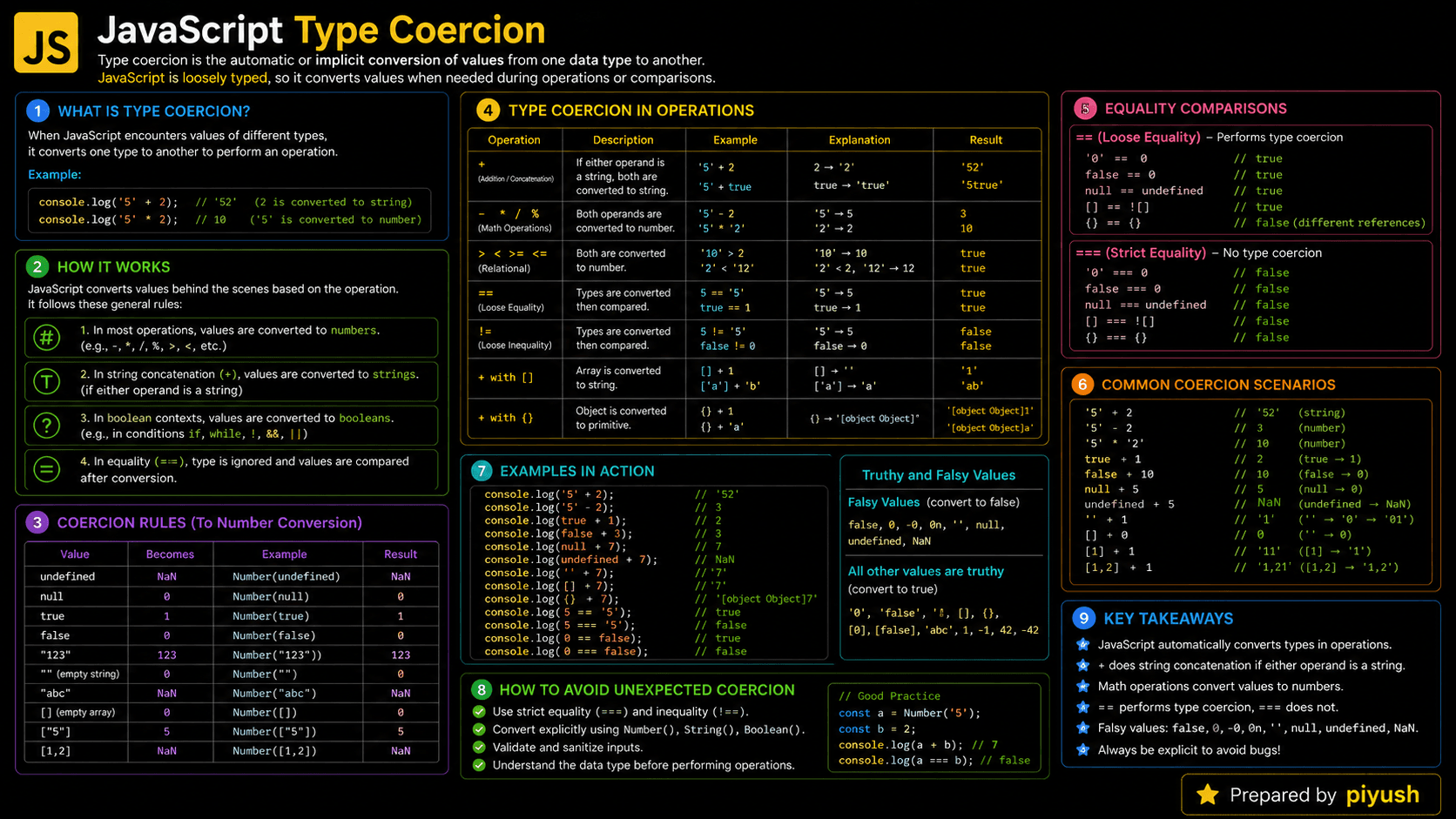
Why does "5" + 2 give you "52", while "5" - 2 gives you 3? The answer is JavaScript type coercion: the process of converting a value from one data type to another.
You'll run into coercion everywhere, form handling, API responses, comparisons, calculations, and conditional logic. Once you know the rules, you can predict what JavaScript will do instead of guessing.
What You'll Learn About JavaScript Type Coercion
Here are the conversion rules you need to read and write predictable JavaScript code.
- Why JavaScript performs type coercion
- The difference between implicit and explicit conversion
- How strings, numbers, booleans, and objects are converted
- How
==,===, and arithmetic operators behave - Common coercion mistakes and safer alternatives
- What the JavaScript engine does during conversion
Prerequisites for Learning Type Coercion
A little comfort with JavaScript values, operators, and comparisons will make the conversion rules easier to follow.
Review these foundations if they are unfamiliar:
You can also test your foundation with:
Why Does Type Coercion Exist?
Coercion exists so JavaScript can work with values whose types are only known at runtime. Web apps constantly receive text from form fields, URL parameters, HTML attributes, and network responses. If you had to convert every one of those before comparing, calculating, or building a string, common tasks would get a lot noisier.
JavaScript was built as a flexible, dynamically typed language for the web. Its designers let the runtime convert compatible values on its own when an operator needs a particular type, which is what makes an expression like "Items: " + count so painless to write.
Without coercion, you'd wrap String(count) or Number(input) around every mixed-type operation. That explicit style is often safer, but automatic conversion still earns its place once you understand the rules. The problem was never coercion itself, it's leaning on it without knowing which conversion JavaScript will pick.
A Mental Model for Type Coercion
Coercion clicks into place when you picture each operator as a worker with an entry requirement.
Imagine an operator standing at a doorway. Subtraction admits only numbers, so it asks every incoming value to put on a "number uniform." The plus operator is the unpredictable one, because it can either add or join text. If either converted value shows up wearing a string uniform, + joins them as text.
The original value usually doesn't change. JavaScript builds or reuses a converted representation just for that expression, then the operator does its job with those values.
This gives you two questions to ask whenever an expression surprises you: What type does this operator want, and how will each operand be converted? Those two questions beat memorizing isolated examples every time.
Under the hood, JavaScript applies abstract conversion operations, turning a value into a primitive, number, string, or boolean, before it finishes the expression.
A Real-Life Analogy for Type Conversion
Think about paying for something that costs five dollars. You could hand over a five-dollar bill or a fistful of coins. The forms differ, but the cashier converts both into the same amount before checking it against the price.
JavaScript does the same thing. It converts values into a form the operator can use, though the conversion it picks won't always be the one you had in mind.
What Is Type Coercion in JavaScript?
Type coercion is JavaScript's process of converting a value from one data type to another so an operator can use it. It happens automatically through implicit coercion, like converting "5" to a number during subtraction or 2 to a string during concatenation, or on purpose through explicit conversion functions such as Number(), String(), and Boolean().
Here's a small example:
console.log("5" - 2);         // 3: "5" becomes the number 5
console.log("5" + 2);         // "52": 2 becomes the string "2"
console.log(Number("5") + 2); // 7: explicit conversion
How Does Type Coercion Work in JavaScript?
JavaScript inspects the operator and the operand types, converts the values into a common form the operator accepts, and then runs the operation. Arithmetic operators usually want numbers, string contexts want text, and logical contexts evaluate values as truthy or falsy.
Evaluate the operands
JavaScript evaluates each expression and obtains its current value and type.
Inspect the operator
The runtime determines whether the operator expects numbers, strings, primitives, or boolean-like conditions.
Convert incompatible values
JavaScript applies an internal conversion rule, such as converting a numeric string to a number.
Perform the operation
The operator uses the converted values to calculate, concatenate, compare, or choose a branch.
Return a new result
The expression produces a result without normally changing the original operands.
Here's that flow for a single expression:
"12" * 2
   ↓
Number("12") * 2
   ↓
12 * 2
   ↓
24
Think Like the JavaScript Engine
The engine handles coercion as part of evaluating the current expression, not as a separate background process.
- An execution context is active. The global script or current function is already on the call stack.
- Operands are resolved. Variables are found through the current lexical environment and scope chain.
- Values are retrieved from memory. The engine identifies each value's type.
- The operator's rules are applied. For example,
-requests numeric values, while+may choose numeric addition or string concatenation. - Objects may be reduced to primitives. JavaScript can call
Symbol.toPrimitive,valueOf(), ortoString(). - The result is produced. A primitive result is used by the surrounding expression or stored in a variable.
- Temporary values become unreachable. The engine can reclaim associated memory later through garbage collection.
Most primitive conversions don't add another function to the call stack. Object conversions can, though: they may run developer-defined methods, and each of those calls gets its own execution context.
Coercion normally leaves the source value alone. If const input = "10" gets converted during multiplication, input is still a string afterward.
Implicit and Explicit Type Conversion
JavaScript performs implicit coercion on its own; explicit conversion is something you ask for directly.
| Conversion style | Who initiates it? | Example | Result |
|---|---|---|---|
| Implicit coercion | JavaScript runtime | "10" * 2 | 20 |
| Explicit conversion | Developer | Number("10") * 2 | 20 |
| String coercion | Operator or developer | "Total: " + 10 | "Total: 10" |
| Boolean coercion | Conditional context | if ("hello") | Condition passes |
const quantity = "4";
const total = quantity * 5;

console.log(total); // 20Prefer explicit conversion at system boundaries such as forms, query parameters, local storage, and API responses. It makes your intended type visible to other developers.
Core JavaScript Coercion Rules
Most surprising results stop being surprising once you know how JavaScript handles numeric, string, boolean, and object conversion.
Numeric Conversion
Operators such as -, *, /, and % generally convert their operands to numbers.
console.log("8" - "3"); // 5
console.log("8" * 2);   // 16
console.log(null + 1);  // 1
console.log(true + 1);  // 2
Common results from Number() include:
| Value | Numeric result |
|---|---|
"" | 0 |
" " | 0 |
"42" | 42 |
"42px" | NaN |
true | 1 |
false | 0 |
null | 0 |
undefined | NaN |
String Conversion and the Plus Operator
The + operator does double duty: numeric addition and string concatenation. Once any objects are reduced to primitives, if either operand is a string, JavaScript concatenates.
console.log(2 + 3);       // 5
console.log("2" + 3);     // "23"
console.log(2 + "3");     // "23"
console.log(1 + 2 + "3"); // "33"
console.log("1" + 2 + 3); // "123"
Evaluation runs left to right. In 1 + 2 + "3", the first addition produces 3, and that result is then joined with "3".
Boolean Conversion and Truthy Values
Conditional statements convert values to booleans. The following values are falsy:
false0and-00n""nullundefinedNaN
Every other value is truthy, including "false", "0", empty arrays, and empty objects.
console.log(Boolean(""));    // false
console.log(Boolean("0"));   // true
console.log(Boolean([]));    // true
console.log(Boolean({}));    // true
Object-to-Primitive Conversion
When an operator needs a primitive but gets an object, JavaScript works to extract a primitive value from it. A custom Symbol.toPrimitive method lets you control the result.
const product = {
  price: 25,

  [Symbol.toPrimitive](hint) {
    if (hint === "string") {
      return `Product priced at $${this.price}`;
    }

    return this.price;
  }
};

console.log(product + 5);       // 30
console.log(String(product));   // "Product priced at $25"
Without Symbol.toPrimitive, JavaScript falls back to valueOf() and toString(), and the requested conversion hint decides which one it tries first.
How to Recognize Type Coercion in Real Code
Coercion shows up whenever values of different types meet, or a context expects a specific type. Watch for mixed operands like string + number, loose equality with ==, unary operators like +input, template interpolation, and values dropped straight into an if statement.
You'll see it in production code like:
- Converting HTML form values, which are commonly strings
- Parsing URL search parameters
- Testing optional values in React conditional rendering
- Building labels with strings and numbers
- Normalizing API or local storage data
- Sorting numeric values received as text
- Using
value || fallbackwith truthy and falsy rules
Frameworks don't override JavaScript's coercion rules. React event values, Node.js environment variables, and browser storage values usually arrive as strings, so normalize them on purpose.
Practical Type Coercion Examples
Converting Form Input Before Calculation
Form controls hand you string values, even when the user types digits.
const priceInput = "19.99";
const quantityInput = "3";

const total = Number(priceInput) * Number(quantityInput);

if (Number.isFinite(total)) {
  console.log(total.toFixed(2)); // "59.97"
}
Normalizing an API Boolean
Calling Boolean() on the string "false" won't give you false, because every non-empty string is truthy. Compare against known string values instead.
const apiValue = "false";
const isEnabled = apiValue === "true";

console.log(isEnabled); // false
Common Mistakes in Type Coercion
Most coercion bugs trace back to four habits: mixing types with +, using loose equality, feeding in invalid numeric input, or treating every falsy value as missing.
Common mistake: The + operator does not always perform arithmetic. If either primitive operand is a string, it performs string concatenation.
Adding Unconverted User Input
❌ Wrong
const firstInput = "10";
const secondInput = "5";

console.log(firstInput + secondInput); // "105"
✅ Correct
const firstInput = "10";
const secondInput = "5";

const sum = Number(firstInput) + Number(secondInput);
console.log(sum); // 15
Using Loose Equality Without Knowing Its Rules
The == operator may convert operands before comparing them. Strict equality never does.
❌ Wrong
const userId = 0;

if (userId == false) {
  console.log("Unexpected match"); // Runs
}
✅ Correct
const userId = 0;

if (userId === false) {
  console.log("This does not run");
}
There's one loose-equality pattern worth keeping: value == null, which matches both null and undefined. Reach for it only when that behavior is intentional and your team's style rules allow it.
Checking NaN with Equality
❌ Wrong
const result = Number("not-a-number");

console.log(result === NaN); // false
✅ Correct
const result = Number("not-a-number");

console.log(Number.isNaN(result)); // true
Treating Falsy Values as Absent
Falsy coercion can wrongly replace valid values like 0 and "". Nullish coalescing only falls back for null or undefined.
❌ Wrong
const itemCount = 0;
const displayedCount = itemCount || 10;

console.log(displayedCount); // 10
✅ Correct
const itemCount = 0;
const displayedCount = itemCount ?? 10;

console.log(displayedCount); // 0
Best Practices for Predictable Conversions
Explicit conversion makes validation easier and cuts down on surprises.
- Use
Number(value),String(value), andBoolean(value)when conversion is intentional. - Prefer
===and!==for comparisons. - Validate numeric conversions with
Number.isFinite()orNumber.isNaN(). - Convert external input as soon as it enters your application.
- Use
??when0,false, or""are valid values. - Avoid clever coercion shortcuts when readable code expresses the same intent.
- Remember that
parseInt()parses text, whileNumber()validates the entire numeric string.
A useful habit is to normalize first, validate second, and calculate last. Do not mix all three jobs into one expression.
Real-World Uses of Type Coercion
Coercion turns up across browser, frontend, and server-side JavaScript.
- Form processing: Converting input strings into numbers, dates, or booleans
- URL parameters: Normalizing pagination numbers and filter values
- Environment variables: Converting Node.js configuration strings
- Conditional rendering: Evaluating whether values are truthy or falsy
- API validation: Converting or rejecting inconsistent response data
- Data formatting: Combining names, counts, currency values, and labels
- Custom domain objects: Defining primitive behavior with
Symbol.toPrimitive
The safest rule in production: treat external data as untrusted. Convert it explicitly, then check that the result is valid before you use it.
JavaScript Type Coercion Interview Questions
These questions test whether you understand the conversion rules, not whether you've memorized outputs.
Frequently Asked Questions About Type Coercion
Short answers to the questions developers hit most while learning how JavaScript converts values.
Related JavaScript Topics and Quizzes
Continue with the conversion, comparison, and data type concepts that support this topic.
🔑 Key Takeaways
- Type coercion converts values from one JavaScript data type to another.
- Implicit coercion is automatic; explicit conversion states your intention.
- The
+operator can add numbers or concatenate strings. - Arithmetic operators such as
-,*, and/request numeric values. - Prefer strict equality unless loose equality is a deliberate choice.
- Normalize and validate external data before using it.
Test Your Type Coercion Knowledge
Reading the rules helps, but predicting real expressions is what makes them stick.